HowTo: Upgrade CentOS Linux 6.4/6.3/6.2/6.1/6.0 to v6.5

| Tutorial details | |
|---|---|
| Difficulty | Intermediate (rss) |
| Root privileges | Yes |
| Requirements | CentOS v6.{0..4} |
| Estimated completion time | 20m |
Back up any important data on the server/workstation
Make a backup - it cannot be stressed enough how important it is to make a backup of your system before you do this. You need to backup config files, user data stored in $HOME, pgsql/msyql/oracle and co databases, and web apps files. In short, backup all the data. Most of the actions listed in this post are written with the assumption that they will be executed by the root user running the bash or any other modern shell.See your current CentOS release information
Type the following commands to see current version:$ uname -mrs
$ cat /etc/redhat-releaseSample outputs:
CentOS release 6.4 (Final)
Show list of available updates
To list all packages with updates available with new release, enter:# yum clean all
# yum check-updateOR
# yum clean all
 # yum list updates
Sample outputs:
Loaded plugins: downloadonly, fastestmirror, security
Loading mirror speeds from cached hostfile
 * base: centos.mirrors.tds.net
 * extras: lug.mtu.edu
 * updates: yum.singlehop.com
Updated Packages
abrt.x86_64                            2.0.8-21.el6.centos               base
abrt-addon-ccpp.x86_64                 2.0.8-21.el6.centos               base
abrt-addon-kerneloops.x86_64           2.0.8-21.el6.centos               base
abrt-addon-python.x86_64               2.0.8-21.el6.centos               base
abrt-cli.x86_64                        2.0.8-21.el6.centos               base
....
..
...
sysvinit-tools.x86_64                  2.87-5.dsf.el6                    base
udev.x86_64                            147-2.51.el6                      base
util-linux-ng.x86_64                   2.17.2-12.14.el6                  base
xmlrpc-c.x86_64                        1.16.24-1210.1840.el6             base
xmlrpc-c-client.x86_64                 1.16.24-1210.1840.el6             base
xorg-x11-drv-ati-firmware.noarch       7.1.0-3.el6                       base
Note: Upgrade speed depends upon
various factors such as the current system load, upstream rpm fetch
server bandwidth and your Internet connection speed.
CentOS Linux: Upgrading your current system
Type the following yum command to upgrade:# yum clean allSample outputs:
Loaded plugins: downloadonly, fastestmirror, security
Cleaning repos: base extras updates
Cleaning up Everything
Cleaning up list of fastest mirrors
To update, enter:
# yum updateSample outputs:
Loaded plugins: downloadonly, fastestmirror, security
Determining fastest mirrors
 * base: mirrors.einstein.yu.edu
 * extras: mirrors.loosefoot.com
 * updates: yum.singlehop.com
base                                                     | 3.7 kB     00:00
base/primary_db                                          | 4.4 MB     00:01
extras                                                   | 3.4 kB     00:00
extras/primary_db                                        |  18 kB     00:00
updates                                                  | 3.4 kB     00:00
updates/primary_db                                       |  26 kB     00:00
Setting up Update Process
Resolving Dependencies
--> Running transaction check
---> Package abrt.x86_64 0:2.0.8-16.el6.centos.1 will be updated
---> Package abrt.x86_64 0:2.0.8-21.el6.centos will be an update
---> Package abrt-addon-ccpp.x86_64 0:2.0.8-16.el6.centos.1 will be updated
---> Package abrt-addon-ccpp.x86_64 0:2.0.8-21.el6.centos will be an updateInstalling for dependencies:
....
..
...
 lzo                             x86_64 2.03-3.1.el6              base     55 k
 make                            x86_64 1:3.81-20.el6             base    389 k
 p11-kit                         x86_64 0.18.5-2.el6              base     94 k
 p11-kit-trust                   x86_64 0.18.5-2.el6              base     71 k
 shared-mime-info                x86_64 0.70-4.el6                base    209 k
 snappy                          x86_64 1.1.0-1.el6               base     39 k

Transaction Summary================================================================================
Install       7 Package(s)
Upgrade     128 Package(s)

Total download size: 122 M
Is this ok [y/N]:  y
Downloading Packages:
(1/135): abrt-2.0.8-21.el6.centos.x86_64.rpm             | 208 kB     00:00
(2/135): abrt-addon-ccpp-2.0.8-21.el6.centos.x86_64.rpm  | 116 kB     00:00
(3/135): abrt-addon-kerneloops-2.0.8-21.el6.centos.x86_6 |  65 kB     00:00
(4/135): abrt-addon-python-2.0.8-21.el6.centos.x86_64.rp |  65 kB     00:00
(5/135): abrt-cli-2.0.8-21.el6.centos.x86_64.rpm         |  54 kB     00:00
....
..
...
  Updating   : openssh-clients-5.3p1-94.el6.x86_64                      107/263
  Updating   : openssh-server-5.3p1-94.el6.x86_64                       108/263
warning: /etc/ssh/sshd_config created as /etc/ssh/sshd_config.rpmnew
  Updating   : parted-2.1-21.el6.x86_64                                 109/263
  Updating   : biosdevname-0.5.0-2.el6.x86_64                           110/263
  Updating   : libdrm-2.4.45-2.el6.x86_64                               111/263
...
..
...
  Verifying  : lvm2-2.02.98-9.el6_4.3.x86_64                            262/263
  Verifying  : efibootmgr-0.5.4-10.el6.x86_64                           263/263

Installed:
  kernel.x86_64 0:2.6.32-431.el6

Dependency Installed:
  lzo.x86_64 0:2.03-3.1.el6               make.x86_64 1:3.81-20.el6
  p11-kit.x86_64 0:0.18.5-2.el6           p11-kit-trust.x86_64 0:0.18.5-2.el6
  shared-mime-info.x86_64 0:0.70-4.el6    snappy.x86_64 0:1.1.0-1.el6

Updated:
  abrt.x86_64 0:2.0.8-21.el6.centos
  abrt-addon-ccpp.x86_64 0:2.0.8-21.el6.centos
....
..
  systemtap-runtime.x86_64 0:2.3-3.el6
  sysvinit-tools.x86_64 0:2.87-5.dsf.el6
  udev.x86_64 0:147-2.51.el6
  util-linux-ng.x86_64 0:2.17.2-12.14.el6
  xmlrpc-c.x86_64 0:1.16.24-1210.1840.el6
  xmlrpc-c-client.x86_64 0:1.16.24-1210.1840.el6
  xorg-x11-drv-ati-firmware.noarch 0:7.1.0-3.el6

Complete!
Reboot the Linux server using any one of the following method:
# rebootOR
# shutdown -r nowSample outputs:
Broadcast message from vivek@db1
 (/dev/pts/0) at 2:20 ...

The system is going down for reboot NOW!
[root@db1 vivek]# Connection to 173.xxx.yyy.zzz closed by remote host.
Connection to 173.xxx.yyy.zz closed.
Verification: After rebooting the box
Verify that everything is working fine and you have been upgraded to the latest CentOS Linux v6.5 release with the following commands:# uname -a
# cat /etc/redhat-releaseSample outputs:
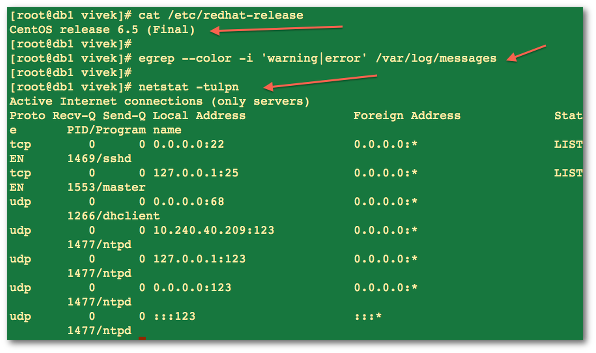
Fig.01: CentOS Linux 6.5 Final
Verify open ports and make sure your apps are running without any problems with the following commands:
# netstat -tulpn
 # tail -f /var/log/messages
 # tail -f /path/to/log/files
 # ps aux | less
 # ps aux | egrep 'httpd|mysql'
 # pgrep 'my_app'
See yum(8) command man page for more information.

No hay comentarios:
Publicar un comentario